 WoW Forever Rotation
 — Practice Every Class
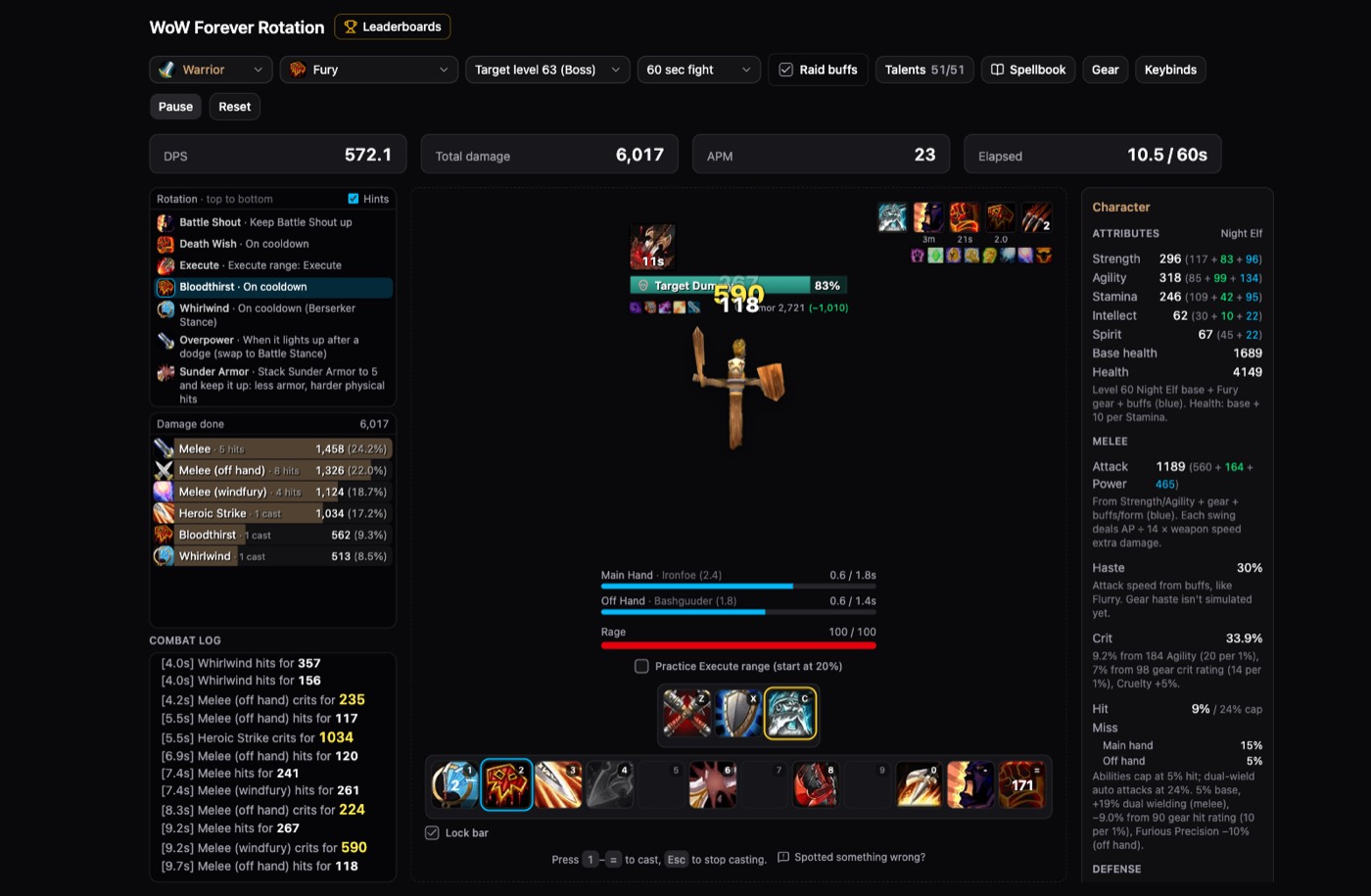
WoW Forever Rotation lets you practice all 9 classes and 42 specs on a level 63 boss dummy, right in your browser.
Ready when you are
Free · no sign-up · runs in your browser
Choose your class
Pick a Warrior spec
WoW Forever Rotation simulator created by karotdevs. Prefer a full page? Open it in a new tab.
What WoW Forever Rotation practice feels like
WoW Forever Rotation lets you try how a class plays before you spend weeks leveling it. Every spec plays at level 60 in end-game gear, with its own priority list, and the next button lights up as you fight.
It isn't a DPS calculator. The goal of WoW Forever Rotation is to teach the timing of procs, cooldowns and resources, so the numbers are a guide and not a promise.
In WoW Forever Rotation, you choose the target level and a fight length of 1, 2, 3 or 5 minutes. Raid buffs are on by default, so your WoW Forever Rotation feels close to a real raid, with the debuffs a full group puts on the boss.
 Example: Fury Warrior priority
- 01Battle ShoutRefresh it whenever it is missing.
- 02Death WishUse it on cooldown.
- 03ExecuteYour first choice once the target enters execute range.
- 04BloodthirstUse it on cooldown.
- 05WhirlwindUse it on cooldown in Berserker Stance.
- 06OverpowerSwap to Battle Stance when it lights up after a dodge.
WoW Forever Rotation guides by specialization
Each WoW Forever Rotation guide lists the spell priority, explains how the fight plays and points out common mistakes. You can practice that exact spec on the same page.
Fury WarriorKeep Bloodthirst and Whirlwind rolling, then spend spare rage on Heroic Strike.Read and practice → Frost MageHold Ice Lance until you have two Fingers of Frost stacks, and fill with Frostbolt.Read and practice →
 Fire MageStack Fire Vulnerability with Scorch, use Combustion at five, and Pyroblast at three Heating Up.Read and practice →
 Retribution PaladinTwist between your seals at three Echoes, and keep Judgement and Holy Strike on cooldown.Read and practice →
 Combat RogueBuild with Sinister Strike, keep Slice and Dice up, and use Shank to refill energy.Read and practice →
 Enhancement ShamanSet totems before the pull, then build around Stormstrike and Maelstrom Weapon.Read and practice →
 Affliction WarlockKeep your curse, Corruption and Immolate up, then fill with Shadow Bolt.Read and practice →
 Shadow PriestStay in Shadowform, keep your DoTs up, and pair Inner Focus with Mind Blast.Read and practice →
 Feral DruidOpen with Ravage, keep Rip and Rake up, and bite at five combo points.Read and practice →
How to practice a rotation
Learning a WoW Forever Rotation takes three steps, and a first run takes about a minute.
01
Pick your spec
Choose a class and spec on the cover above. Your WoW Forever Rotation fight starts on a reference build, and you can change talents, gear and the action bar.
02
Follow the hints
Press Start, then use keys 1 to = as the next spell lights up. Once the WoW Forever Rotation feels familiar, turn the hints off and play from memory.
03
Beat the bot
At the end of a fight, compare your WoW Forever Rotation with a bot that plays the hints perfectly. Your last 30 runs appear on a chart, so you can watch yourself improve.
Default controls
| Key | What it does |
|---|---|
| 1 to = | Cast the spells on your action bar |
| Z, X, C | Switch stance or form, where your class has them |
| Shift + 1 to 4 | Use the opener bar |
| F1 to F5 | Choose your heal target as a healer |
| Esc | Stop casting and clear the spell queue |
You can rebind these WoW Forever Rotation keys in Keybinds, and the simulator remembers them in your browser.
Common WoW Forever Rotation mistakes
Most players lose damage in the same few ways. Check these first when your WoW Forever Rotation falls behind the bot.
Reading the hints instead of the fight
Hints teach the WoW Forever Rotation, but they can become a crutch. Turn them off after a few runs, and watch your buffs, debuffs and resources directly.
Wasting global cooldowns
A late button press costs your WoW Forever Rotation more than a slightly wrong one. The spell queue accepts your next press in the last 0.4 seconds of a cast, so press early and keep moving.
Missing procs
Abilities made usable by a proc glow gold on the bar. If you only look at the hint list, you will miss them. A clean WoW Forever Rotation reacts to the glow.
Practicing only the opening
Execute, Hammer of Wrath and Shadow Word: Death open up in the last 12 seconds of the fight. Tick the practice option to start the target at 20% health and rehearse the end of your WoW Forever Rotation.
Choosing a class by its rotation
Your WoW Forever Rotation should suit how you like to play. Each class has its own rhythm, so try the one that sounds right to you.

Warrior: Generate rage, swap stances and press Overpower the moment it lights up.

Rogue: Spend energy, build combo points and open from Stealth.

Paladin: Twist seals around your weapon swings and time each Judgement.

Hunter: Weave shots and melee, or choose a Turret build that stands and shoots.

Shaman: Set totems and imbues before the pull, then react to your procs.

Druid: Choose a form, with its own action bar for caster, cat or bear.

Mage: Manage mana and spend procs like Fingers of Frost or Heating Up.

Warlock: Choose a demon, keep your effects on the target and fill with Shadow Bolt.

Priest: Keep shadow damage ticking, or keep a five-person party alive.
About the simulator and its data
This WoW Forever Rotation site adds guides around a free simulator created by karotdevs. You can also use the original WoW Forever Rotation simulator directly, and you can support its creator on Ko-fi.
The simulator credits its talent data to talentsforever.com by Baldwin Builds and takes its reference builds from MythicSim. Our WoW Forever Rotation guides follow the simulator's hints after the November 2026 talent rework.
Frequently asked questions
WoW Forever Rotation is a free site for learning the spell priority of each class in World of Warcraft: Forever. You can read a guide for a spec, then practice it in a browser simulator.
Yes. WoW Forever Rotation is free to use, with nothing to install and no account to create.
No. WoW Forever Rotation is an unofficial fan site with no connection to Blizzard Entertainment. The embedded simulator was created by karotdevs.
No. The simulator isn't a DPS calculator. It captures how a class feels to play, so treat its numbers as a rough guide and not as a ranking of the specs.
Choose the class you want to play, then try two or three of its specs for 60 seconds each. A WoW Forever Rotation you enjoy pressing is easier to learn well than one picked from a tier list.
Yes. Open Talents, Gear or Spellbook in the simulator. In WoW Forever Rotation, each spec starts on a reference build, and your talent changes are saved in your browser.
Yes. Holy and Discipline Priest, Restoration Druid, Restoration Shaman and Holy Paladin heal a five-person party through a boss fight, with raid frames, dispels and mouseover casting.
Yes. The simulator has a touch layout with tabs for the rotation, damage, log and character. A keyboard still gives you the closest feel to the game.
Your runs are linked to an anonymous ID stored in your browser, with no login. If you clear your browser data or change device, the simulator treats you as a new player.